The best free text-to-speech apps for iPhone.

"Free" means very different things across these apps. Here is what each free plan actually includes.

Updated

Download on theApp Store Free on iPhone and iPad
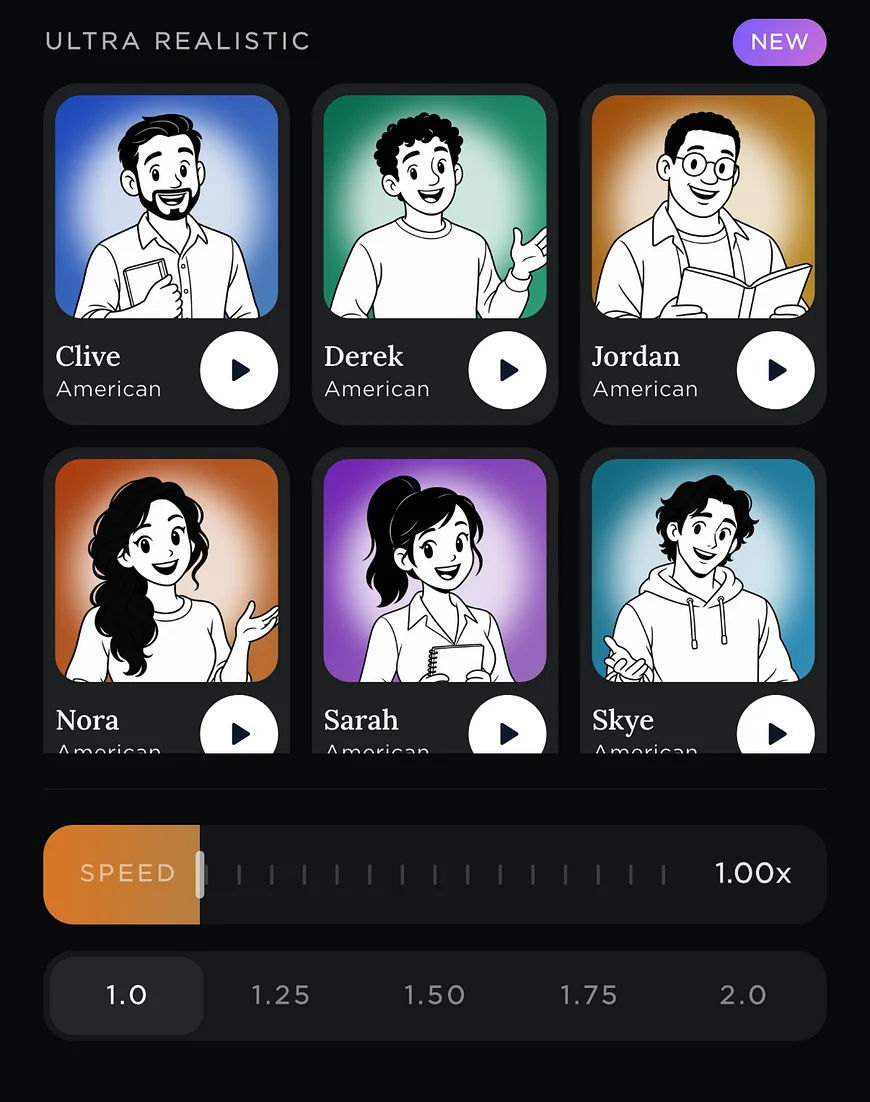
Readible's Ultra Realistic voices with a speed slider.
Free
7 picks
Short answer

Readible's free plan has unlimited offline voices plus 10 hours of cloud voices every 30 days and one Kindle book a month. ElevenReader's free plan gives 10 hours a month of natural voices. Speak Screen and the Kindle app's Assistive Reader are free and built in. Speech Central is free with a daily limit. Speechify's free plan is basic voices at up to 1.5x.

The list

7 picks, and who each one suits.

We make Readible and list it first for the jobs it's built for. The rest are ordered by how well they fit this job, using each company's own published facts.

1. Readible

Best for: The most generous free offline listening

Reads your Kindle library, EPUBs, PDFs and webpages aloud with natural cloud voices and sentence highlighting, on iPhone and iPad. On-device voices work offline on every plan, PDFs are read without repeated headers and footers, and web novels move to the next chapter by themselves. It's iPhone and iPad only, with no Android, web or desktop app.

Free: 10 hours of cloud voices every 30 days, 1 Kindle import a month, unlimited offline voicesYearly: Pro $24.99 · Premium $71.99Kindle: Yes: sign in to Amazon in the app and import books from your library

2. ElevenReader

Best for: Natural voices for 10 hours a month

Made by ElevenLabs, with some of the most natural voices available and a 10-hour monthly free plan. Reads Kindle books through Kindle Cloud Reader inside the app. Offline downloads need Ultra.

Free: 10 hours a month, no offline downloadsYearly: Ultra $99Kindle: Yes: opens Kindle Cloud Reader in the app and reads the page on screen

3. Speak Screen

Best for: Nothing to install, any app

Built into iOS: turn it on in Settings › Accessibility and swipe down with two fingers to hear what's on screen in any app. Free, but it reads page furniture too and can lose its place on long documents.

Free: Free, built into iOSYearly: Free, built into iOSKindle: Reads the Kindle app's screen

4. Kindle Assistive Reader

Best for: Free Kindle listening

Built into the Kindle app since April 2025. Reads books with Enhanced Typesetting aloud using your device's voices, with highlighting. Free, but limited to system voices, and users report that some titles and speed settings don't work.

Free: Free in the Kindle appYearly: Free in the Kindle appKindle: Yes, on books with Enhanced Typesetting

5. Speech Central

Best for: Articles and PDFs with offline voices

A long-running reader for articles, RSS and PDFs, including scanned and two-column ones, with Apple and offline neural voices. The free plan has a daily article limit, and Pro is a one-time $9.99. Free for blind VoiceOver users.

Free: Yes, with a daily article limitYearly: Pro is a one-time $9.99Kindle: No (DRM books aren't supported)

6. Adobe Acrobat Reader

Best for: PDFs, if you already use Acrobat

The free Acrobat Reader app now reads PDFs aloud with free voices, with chapter jumping and CarPlay; Premium ($69.99 a year) adds higher-quality voices. Some Premium users report falling back to robotic offline voices.

Free: Read aloud with free voicesYearly: Premium $69.99, with higher-quality voicesKindle: No

7. Speechify

Best for: Trying Speechify before paying

The best-known read-aloud app, on iPhone, iPad, Android, the web and as Chrome and Edge extensions. Premium has 1,000+ voices, 5x speed, scanning and AI summaries; the free plan is limited to basic voices at 1.5x.

Free: 10 standard voices, up to 1.5xYearly: Premium $139Kindle: Chrome extension on Kindle Cloud Reader; not documented in the iPhone app
At a glance

The main picks, side by side.

FeatureReadibleElevenReaderSpeak ScreenSpeech Central
Free plan10 hours of cloud voices every 30 days, 1 Kindle import a month, unlimited offline voices10 hours a month, no offline downloadsFree, built into iOSYes, with a daily article limit
Kindle booksYes: sign in to Amazon in the app and import books from your libraryYes: opens Kindle Cloud Reader in the app and reads the page on screenReads the Kindle app's screenNo (DRM books aren't supported)
PDFYes, with repeated headers and footers skippedYesReads what's on screenYes, including scanned and two-column
WebpagesYes: in-app browser, share sheet or pasted link; next chapter loads itself on web novelsYes, plus a Chrome extensionReads what's on screenYes, plus RSS
Offline listeningFree on-device voices on every planUltra: 150 download hours a monthYes, Apple's built-in voicesYes: Apple and offline neural voices
HighlightingSentenceYesWord or sentence—

Prices are US prices from each company's App Store listing or website, checked on November 12, 2026. They change, so check before you buy. "—" means the company doesn't publish it. ElevenReader is a trademark of ElevenLabs. Readible is not affiliated with any of them.

How to choose

Questions worth asking first.

Is the limit time, words or voices? ElevenReader limits hours, Speech Central limits articles a day, and Speechify limits which voices and speeds you get. Readible limits cloud-voice hours but not offline listening.

Does the free plan include offline voices? Offline voices are what make "free" truly unlimited. Readible, Speak Screen, Assistive Reader and Speech Central all use voices on the device.

How we checked

Sources and method.

We make Readible, which competes with the other apps on this page. To keep this fair, every fact comes from the company's own App Store listing, pricing page or help docs, checked on November 12, 2026. A feature counts as supported only when the company documents it, and we say plainly where another app does something better. If something here is out of date, email readible.support@gmail.com and we'll correct it.

Questions

Good to know.

What is the best free text-to-speech app for iPhone?

Readible if you want unlimited offline listening plus some natural voices; ElevenReader for 10 hours a month of natural voices; Speak Screen if you don't want to install anything.

Is Speechify free?

Speechify has a free plan with 10 standard voices at up to 1.5x. Its natural voices need Premium.

Is there a completely free text-to-speech app?

Speak Screen and the Kindle app's Assistive Reader are free with no limits, using Apple's built-in voices. Readible's on-device voices are also free with no limit.

Can I listen to Kindle books for free?

Yes, with Assistive Reader in the Kindle app, Speak Screen, or Readible's free plan (one Kindle import a month).

Turn your reading pile into listening time.

Download on theApp Store Free on iPhone and iPad
The Readible app icon: an orange book on a dark teal background.