The best apps to listen to Kindle books.

Most Kindle books never get an audiobook. These are the apps that can read the Kindle books you already own aloud on iPhone and iPad, and how each one gets the text.

Updated

Download on theApp Store Free on iPhone and iPad
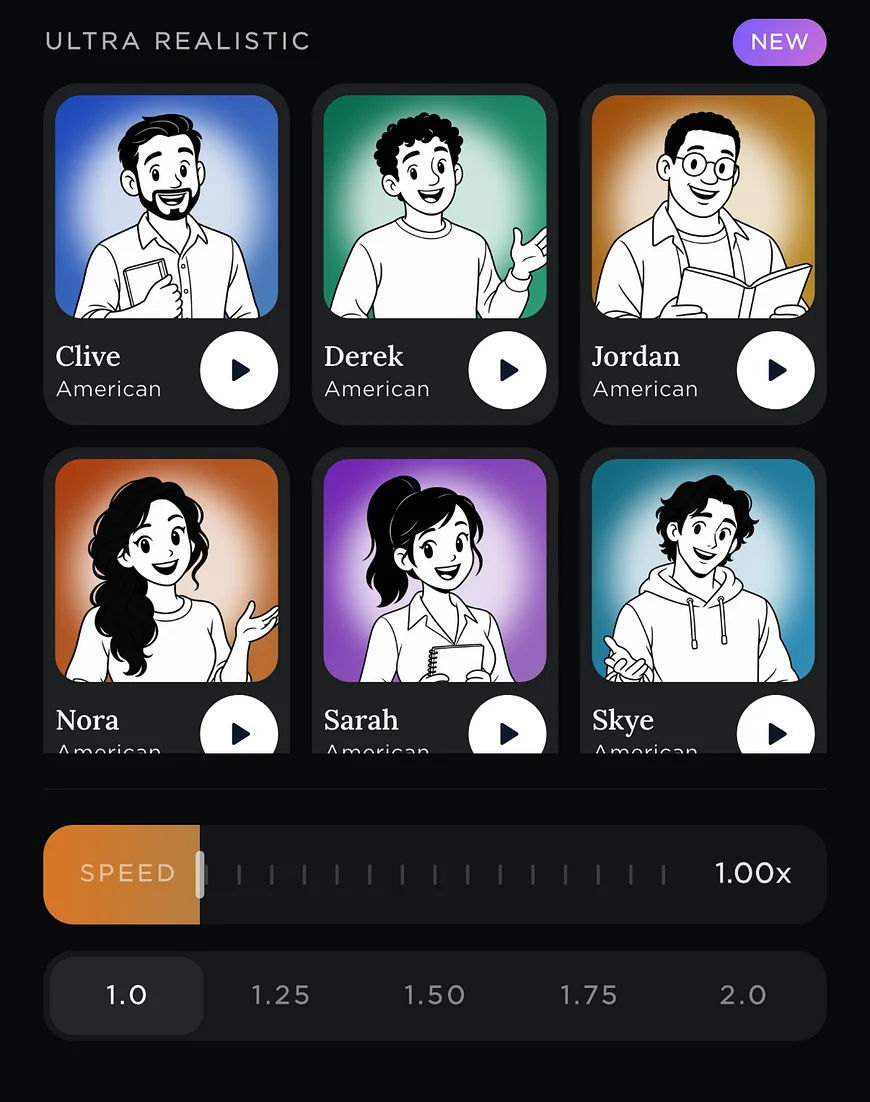
Readible's Ultra Realistic voices with a speed slider.
Kindle
6 ways
Short answer

For natural voices and books saved to your library, Readible imports from your Kindle library. For free, the Kindle app's Assistive Reader reads books with Enhanced Typesetting in your iPhone's voices. ElevenReader reads Kindle Cloud Reader inside its app. If you own the Audible edition, Audible narration is best.

The list

6 picks, and who each one suits.

We make Readible and list it first for the jobs it's built for. The rest are ordered by how well they fit this job, using each company's own published facts.

1. Readible

Best for: Natural voices, and books saved in your library

Reads your Kindle library, EPUBs, PDFs and webpages aloud with natural cloud voices and sentence highlighting, on iPhone and iPad. On-device voices work offline on every plan, PDFs are read without repeated headers and footers, and web novels move to the next chapter by themselves. It's iPhone and iPad only, with no Android, web or desktop app. Sign in to Amazon in the app, pick a book, and Readible prepares the rest of the book while you listen. One Kindle import a month is free; Premium has unlimited imports.

Free: 10 hours of cloud voices every 30 days, 1 Kindle import a month, unlimited offline voicesYearly: Pro $24.99 · Premium $71.99Kindle: Yes: sign in to Amazon in the app and import books from your library

2. Kindle Assistive Reader

Best for: Free listening in the Kindle app

Built into the Kindle app since April 2025. Reads books with Enhanced Typesetting aloud using your device's voices, with highlighting. Free, but limited to system voices, and users report that some titles and speed settings don't work. Turn it on in a book under Aa › More › Assistive Reader.

Free: Free in the Kindle appYearly: Free in the Kindle appKindle: Yes, on books with Enhanced Typesetting

3. ElevenReader

Best for: ElevenLabs voices on Kindle Cloud Reader

Made by ElevenLabs, with some of the most natural voices available and a 10-hour monthly free plan. Reads Kindle books through Kindle Cloud Reader inside the app. Offline downloads need Ultra.

Free: 10 hours a month, no offline downloadsYearly: Ultra $99Kindle: Yes: opens Kindle Cloud Reader in the app and reads the page on screen

4. Audible

Best for: Books where you own the narrated audiobook

Audiobooks read by human narrators, sold by credit or title. Whispersync keeps your place between the Kindle book and its Audible edition.

Free: 30-day trialYearly: $149.50 (12 credits) · $229.50 (24 credits)Kindle: Plays the Audible edition of a Kindle book if you own both

5. CastReader

Best for: Another Kindle-library app to try

A newer app that connects to your Kindle library and also reads EPUBs, PDFs and webpages, with free on-device voices. Only a few dozen App Store ratings so far.

Free: On-device voicesYearly: Pro from $34.99Kindle: Yes, connects to your Kindle library (per CastReader)

6. Speak Screen

Best for: A quick listen with nothing to install

Built into iOS: turn it on in Settings › Accessibility and swipe down with two fingers to hear what's on screen in any app. Free, but it reads page furniture too and can lose its place on long documents.

Free: Free, built into iOSYearly: Free, built into iOSKindle: Reads the Kindle app's screen
At a glance

The main picks, side by side.

FeatureReadibleKindle Assistive ReaderElevenReaderCastReader
Free plan10 hours of cloud voices every 30 days, 1 Kindle import a month, unlimited offline voicesFree in the Kindle app10 hours a month, no offline downloadsOn-device voices
MonthlyPro $2.99 · Premium $9.99—Ultra $11Pro from $4.99
YearlyPro $24.99 · Premium $71.99—Ultra $99Pro from $34.99
Kindle booksYes: sign in to Amazon in the app and import books from your libraryYes, on books with Enhanced TypesettingYes: opens Kindle Cloud Reader in the app and reads the page on screenYes, connects to your Kindle library (per CastReader)
Offline listeningFree on-device voices on every planYes, uses your device's voicesUltra: 150 download hours a monthOn-device voices
HighlightingSentenceYesYesYes
PlatformsiPhone, iPadKindle app on iPhone, iPad and Android; Kindle e-readersiPhone, iPad, Android, web, Chrome extensioniPhone, iPad, Mac, Chrome and Edge extensions

Prices are US prices from each company's App Store listing or website, checked on November 12, 2026. They change, so check before you buy. "—" means the company doesn't publish it. Kindle is a trademark of Amazon.com, Inc. ElevenReader is a trademark of ElevenLabs. Readible is not affiliated with any of them.

How to choose

Questions worth asking first.

How does the app get the text? Kindle books are protected, so apps either work inside Amazon's own reader or connect to your Kindle library through Amazon's Kindle web reader. Readible and CastReader import books from your library; ElevenReader reads the Cloud Reader page on screen; Assistive Reader and Speak Screen read inside the Kindle app.

Which voices? Assistive Reader and Speak Screen use your iPhone's built-in voices. Readible, ElevenReader and CastReader offer natural AI voices.

Does every book work? Assistive Reader needs Enhanced Typesetting, and users report that it isn't available on some titles. Readible works with books you can open in Amazon's Kindle web reader at read.amazon.com.

Want the details? How to listen to Kindle books on iPhone, step by step.

How we checked

Sources and method.

We make Readible, which competes with the other apps on this page. To keep this fair, every fact comes from the company's own App Store listing, pricing page or help docs, checked on November 12, 2026. A feature counts as supported only when the company documents it, and we say plainly where another app does something better. If something here is out of date, email readible.support@gmail.com and we'll correct it.

Questions

Good to know.

Can the Kindle app read books aloud on iPhone?

Yes. Since April 2025 the Kindle app has Assistive Reader, which reads books with Enhanced Typesetting aloud using your iPhone's voices. Open a book, tap Aa, then More, and turn on Assistive Reader.

What's the best app to listen to Kindle books?

For natural voices and your books saved in one library, Readible. For a free option inside the Kindle app, Assistive Reader. For ElevenLabs voices, ElevenReader.

Can I listen to Kindle books without Audible?

Yes. Assistive Reader, Readible, ElevenReader and Speak Screen all read the Kindle ebook itself, so you don't need to buy the audiobook.

Is there a free way to listen to Kindle books?

Assistive Reader and Speak Screen are free. Readible's free plan includes one Kindle import a month, and ElevenReader's free plan includes 10 hours a month.

Does Speechify read Kindle books on iPhone?

Speechify documents reading Kindle Cloud Reader through its Chrome extension on a computer, not in its iPhone app.

Turn your reading pile into listening time.

Download on theApp Store Free on iPhone and iPad
The Readible app icon: an orange book on a dark teal background.