The best apps to read PDFs aloud.

Reports, papers and textbooks, read to you. What separates these apps is how they deal with the parts of a PDF you don't want to hear.

Updated

Download on theApp Store Free on iPhone and iPad
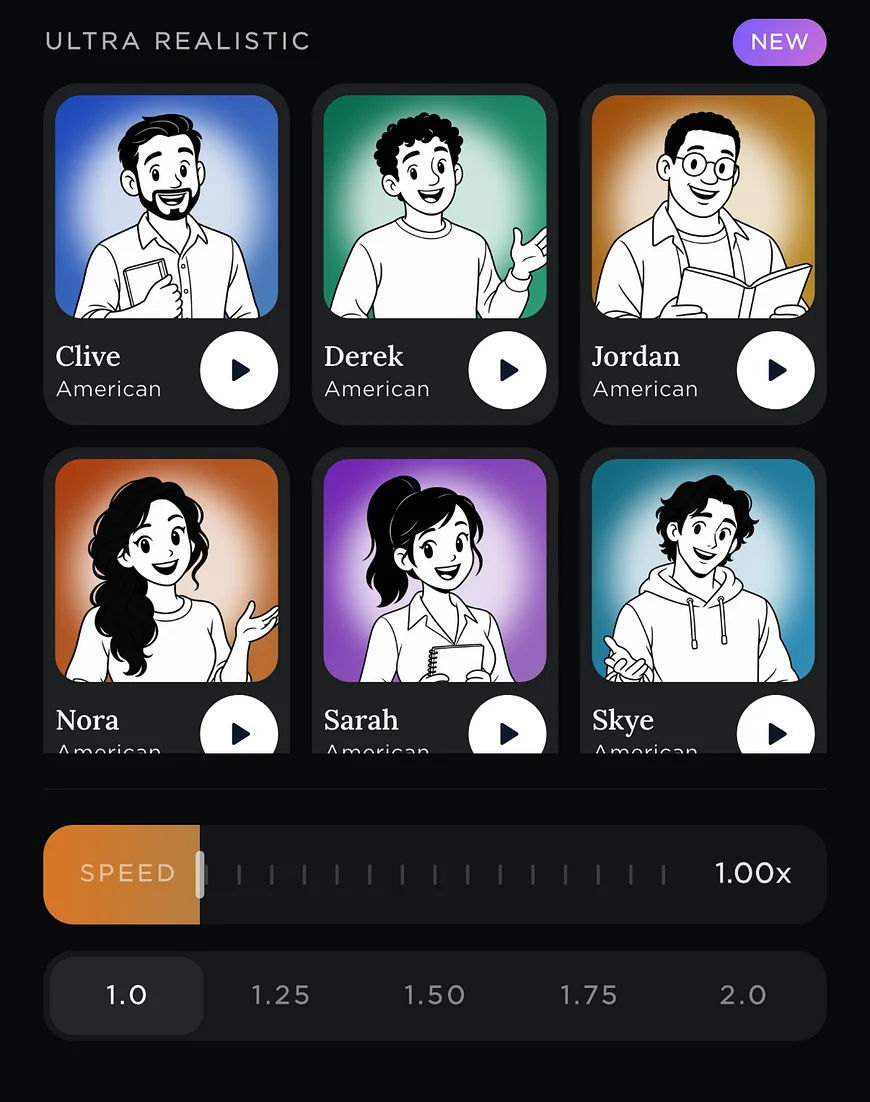
Readible's Ultra Realistic voices with a speed slider.
PDF
Prices checked
Short answer

For long PDFs read cleanly in natural voices, Readible skips repeated headers and footers and joins words split across lines. If you already use Acrobat or PDF Expert, both now read PDFs aloud for free. For scanned and two-column PDFs, Speech Central and NaturalReader. For nothing to install, Speak Screen in the Files app.

The list

7 picks, and who each one suits.

We make Readible and list it first for the jobs it's built for. The rest are ordered by how well they fit this job, using each company's own published facts.

1. Readible

Best for: Long PDFs, read without the page furniture

Reads your Kindle library, EPUBs, PDFs and webpages aloud with natural cloud voices and sentence highlighting, on iPhone and iPad. On-device voices work offline on every plan, PDFs are read without repeated headers and footers, and web novels move to the next chapter by themselves. It's iPhone and iPad only, with no Android, web or desktop app.

Free: 10 hours of cloud voices every 30 days, 1 Kindle import a month, unlimited offline voicesYearly: Pro $24.99 · Premium $71.99Kindle: Yes: sign in to Amazon in the app and import books from your library

2. Adobe Acrobat Reader

Best for: Free read-aloud in an app you may already have

The free Acrobat Reader app now reads PDFs aloud with free voices, with chapter jumping and CarPlay; Premium ($69.99 a year) adds higher-quality voices. Some Premium users report falling back to robotic offline voices.

Free: Read aloud with free voicesYearly: Premium $69.99, with higher-quality voicesKindle: No

3. PDF Expert

Best for: People who annotate PDFs

Readdle's PDF editor has text to speech on iPhone and iPad: skip pages, jump to chapters and set the speed. Best if you already use it for annotating PDFs.

Free: Reading and text to speechYearly: Premium $49.99Kindle: No

4. Speech Central

Best for: Scanned and two-column PDFs, one-time price

A long-running reader for articles, RSS and PDFs, including scanned and two-column ones, with Apple and offline neural voices. The free plan has a daily article limit, and Pro is a one-time $9.99. Free for blind VoiceOver users.

Free: Yes, with a daily article limitYearly: Pro is a one-time $9.99Kindle: No (DRM books aren't supported)

5. NaturalReader

Best for: Complex documents and MP3 export

A document-focused reader with 200+ AI voices, voice cloning, MP3 export and a full web app. Reads two-column PDFs in order. Three paid tiers with character limits; no Kindle support.

Free: Yes, with limits on premium voicesYearly: Lite $79 · Plus $119 · Pro $159Kindle: No

6. Voice Dream Reader

Best for: Accessibility users

The long-time favourite of blind, low-vision and dyslexic readers: works closely with VoiceOver, reads almost any format including Bookshare and DAISY, and its voices run on the device. Subscription only since 2024; no Kindle support.

Free: Free trial, then subscriptionYearly: $79.99Kindle: Not supported, per its App Store listing

7. Speak Screen

Best for: A page or two, nothing to install

Built into iOS: turn it on in Settings › Accessibility and swipe down with two fingers to hear what's on screen in any app. Free, but it reads page furniture too and can lose its place on long documents.

Free: Free, built into iOSYearly: Free, built into iOSKindle: Reads the Kindle app's screen
At a glance

The main picks, side by side.

FeatureReadibleAdobe Acrobat ReaderPDF ExpertSpeech Central
Free plan10 hours of cloud voices every 30 days, 1 Kindle import a month, unlimited offline voicesRead aloud with free voicesReading and text to speechYes, with a daily article limit
YearlyPro $24.99 · Premium $71.99Premium $69.99, with higher-quality voicesPremium $49.99Pro is a one-time $9.99
PDFYes, with repeated headers and footers skippedYes, with chapter jumping and CarPlayYes: skip pages, jump to chapters, set speedYes, including scanned and two-column
Offline listeningFree on-device voices on every planFree voices—Yes: Apple and offline neural voices
Camera scanYesYes (Adobe Scan)—Yes
PlatformsiPhone, iPadiPhone, iPad, Android, desktopiPhone, iPad, MaciPhone, iPad

Prices are US prices from each company's App Store listing or website, checked on November 12, 2026. They change, so check before you buy. "—" means the company doesn't publish it. Adobe and Acrobat are trademarks of Adobe Inc. PDF Expert is a trademark of Readdle. Readible is not affiliated with any of them.

How to choose

Questions worth asking first.

Does it skip the page furniture? Running headers, footers and page numbers repeat on every page. Apps that read the screen, like Speak Screen, read them all; Readible leaves out the ones that repeat.

Does it handle columns and scans? Two-column papers need the right reading order, and scanned PDFs need text recognition. Speech Central and NaturalReader say they handle both; Readible can scan a printed page with the camera.

Will you annotate as well as listen? If you mark up PDFs, a PDF editor with read-aloud (Acrobat, PDF Expert) keeps everything in one app.

Step by step: How to have PDFs read aloud on iPhone.

How we checked

Sources and method.

We make Readible, which competes with the other apps on this page. To keep this fair, every fact comes from the company's own App Store listing, pricing page or help docs, checked on November 12, 2026. A feature counts as supported only when the company documents it, and we say plainly where another app does something better. If something here is out of date, email readible.support@gmail.com and we'll correct it.

Questions

Good to know.

What's the best app to read PDFs aloud on iPhone?

For long PDFs, Readible: natural voices, sentence highlighting, and repeated headers and footers skipped. Acrobat Reader and PDF Expert also read PDFs aloud if you already use them.

Can iPhone read a PDF out loud for free?

Yes. Use Speak Screen in the Files app, or the free read-aloud in Adobe Acrobat Reader. Readible's free plan includes 10 hours of cloud voices every 30 days plus unlimited offline voices.

Does Adobe Acrobat Reader read aloud on iPhone?

Yes. The iPhone app reads PDFs aloud with free voices, and Premium adds higher-quality voices.

Which app reads scanned PDFs?

Speech Central and NaturalReader recognise text in scanned PDFs. Readible can photograph a printed page and read it aloud.

Turn your reading pile into listening time.

Download on theApp Store Free on iPhone and iPad
The Readible app icon: an orange book on a dark teal background.